The missing half of Device Hub, plus an Xcode cleaner.
Device Hub Tools lives in your menu bar and docks a side panel right next to Device Hub. It brings back Shake and the Simulator shortcuts you lost, takes framed device screenshots, throttles only the simulator’s network, and clears the gigabytes your developer tools leave behind.
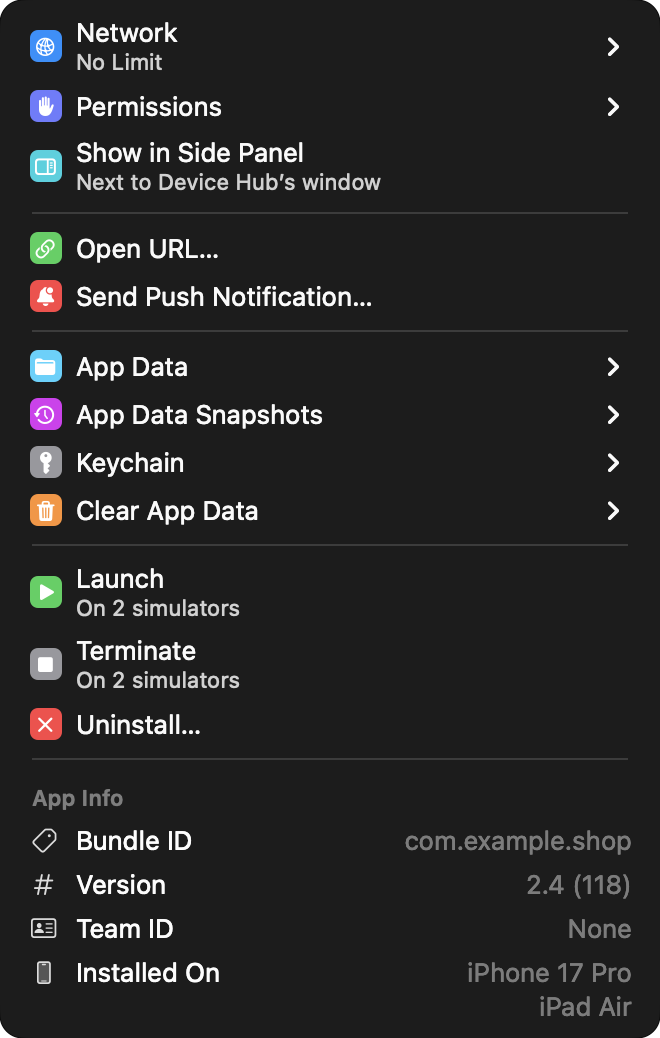
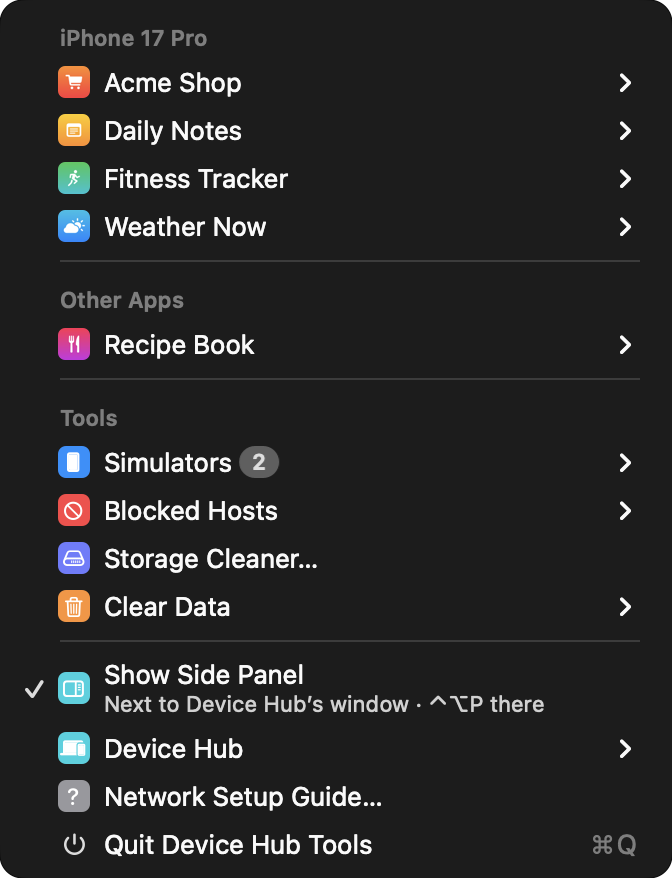
Click the menu bar icon · every app gets its own submenu
02 — Dev storage cleaner
Get your disk back.
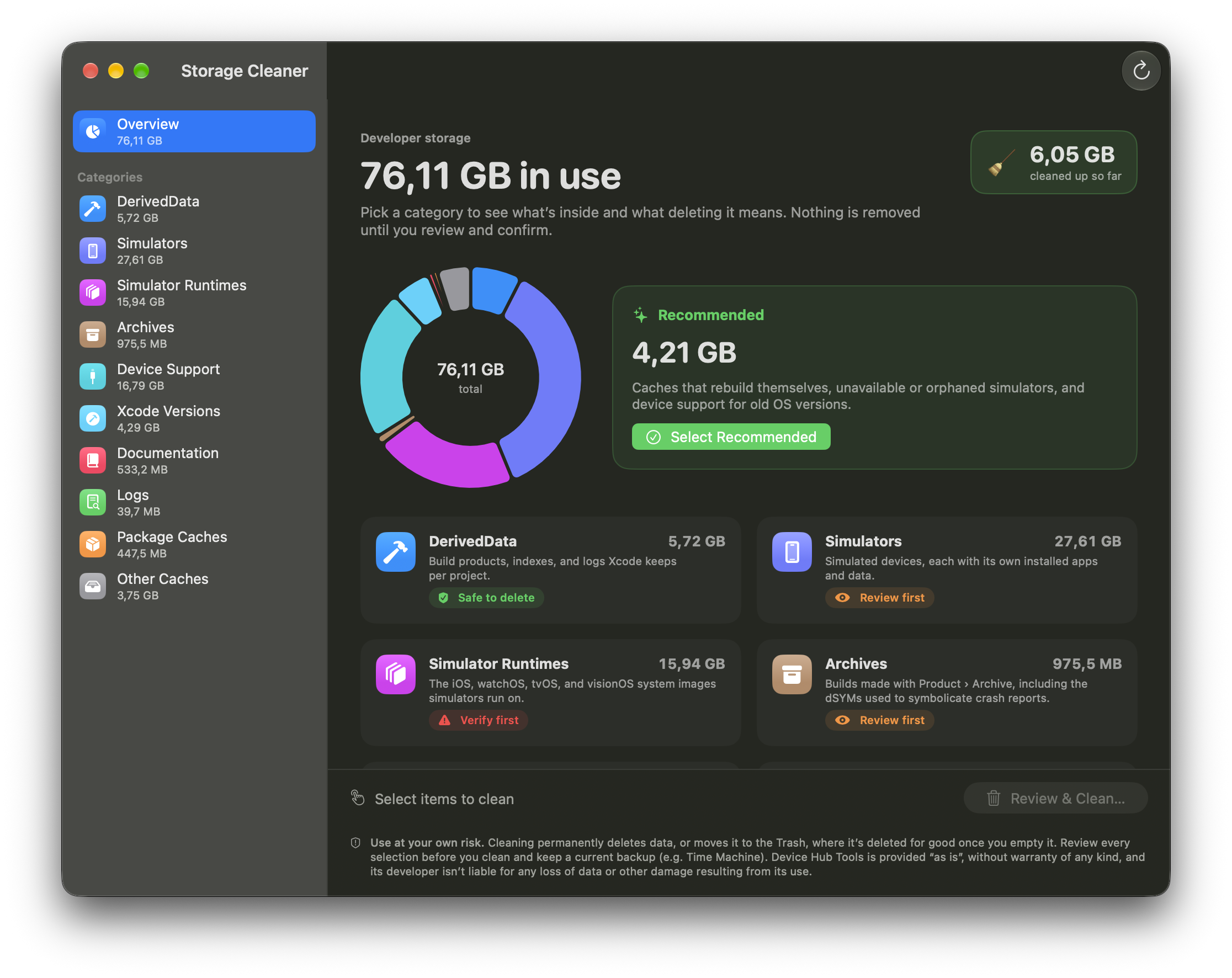
One click or shortcut for the usual suspects, or open the Storage Cleaner for a full scan. Per app, Clear Data only touches that app’s own DerivedData folder. A HUD shows progress and how much space came back.
Clean DerivedDataone click
Clean Swift Package Managercache + SourcePackages
Close and Clean Allthe big reset
SAFETY GUARD
Nothing outside ~/Library, the CocoaPods repos or an installed developer tools app can be deleted. Symlinks are removed as links, never followed. The version you’re using is always protected.
FIG. 2 — STORAGE CLEANER, OVERVIEW
A Every category with what deleting it meansB Safe to delete · Review first · Verify firstC One click selects the recommended cleanupD Keeps count of everything you’ve cleaned
03 — The side panel
Everything Device Hub doesn’t do, docked right beside it.
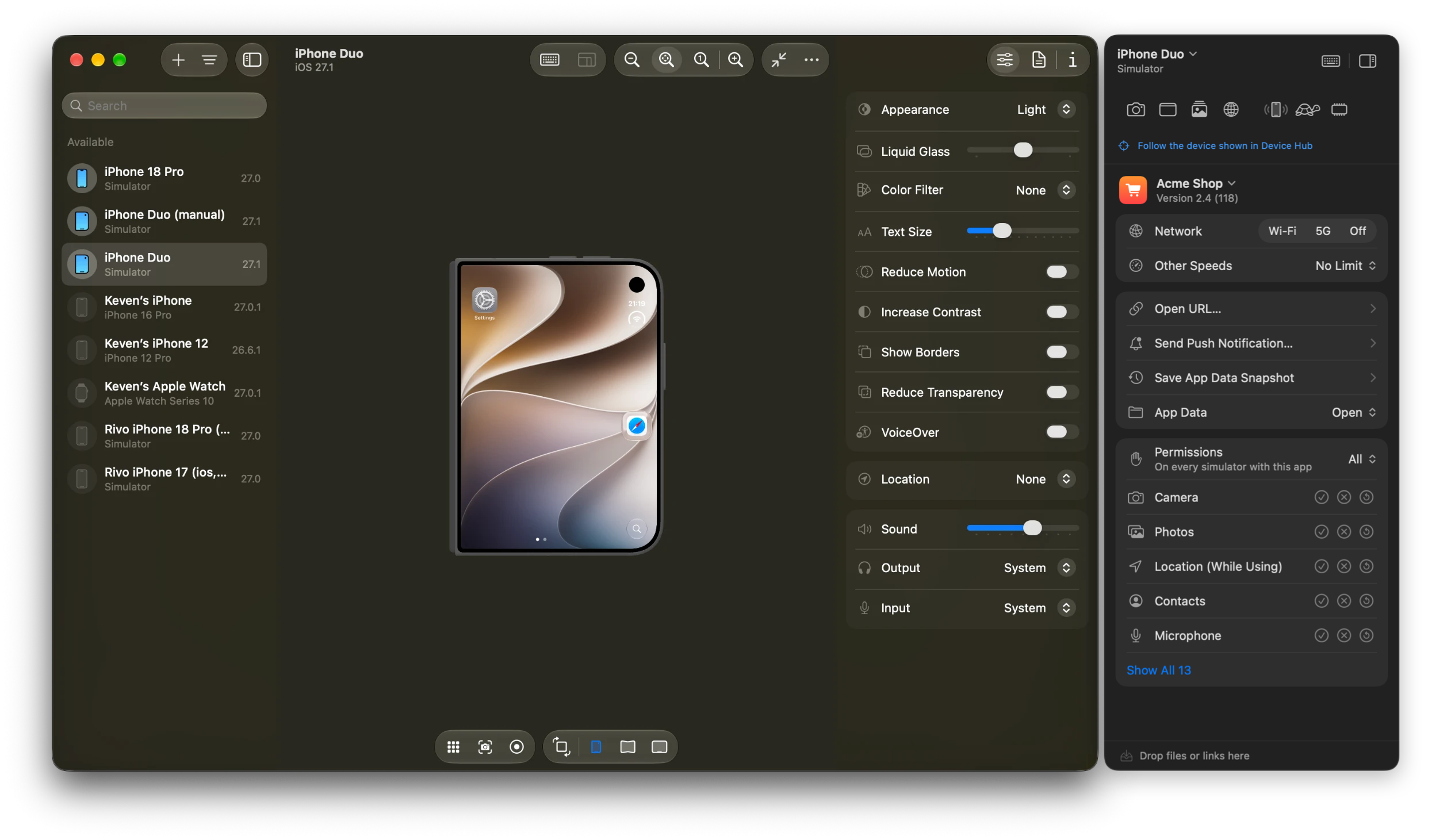
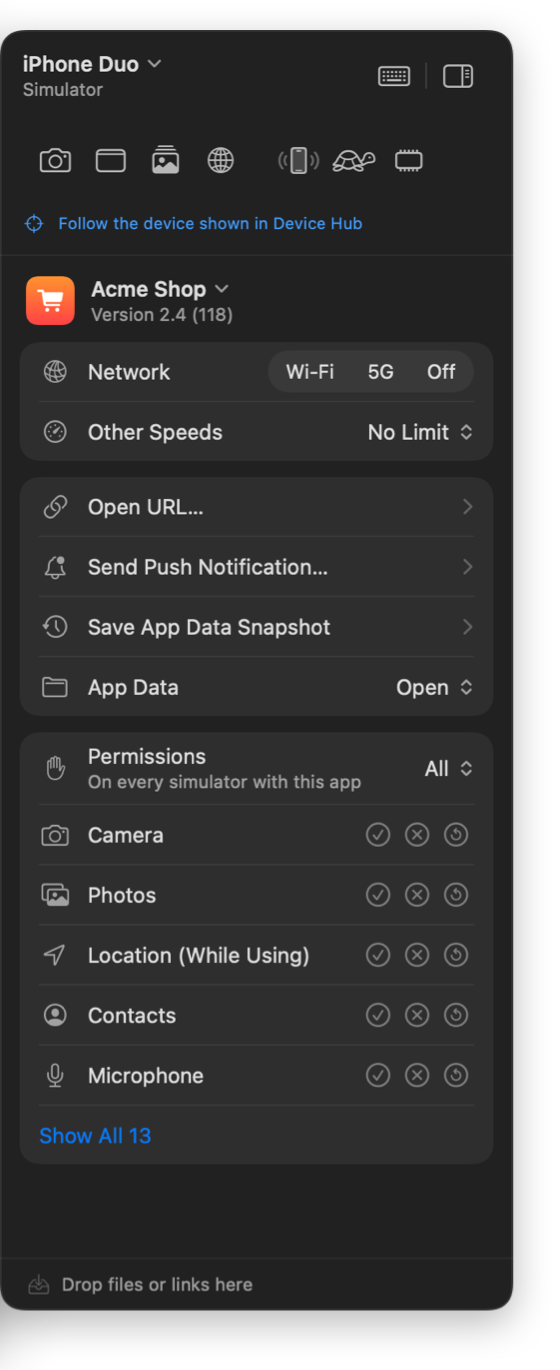
The panel sits next to Device Hub’s window, moves with it, and acts on whichever simulator or iPhone Device Hub is showing. Pick an app and its network, links, push, data and permissions are one click away. ⌃⌥P shows or hides it.
DEVICE HUB
FIG. 3 — DEVICE HUB TOOLS SIDE PANEL, 316 PT, DOCKED 6 PT FROM THE WINDOW
FOLLOWS DEVICE HUB
Always the right device
Acts on the simulator or iPhone Device Hub shows, or pick another one yourself.
ONE-CLICK TOOLS
Screenshot, shake and more
Framed screenshots, clean status bar, sample media and gestures in one row.
NETWORK PER APP
Wi-Fi, 5G, Off
Or any slower speed, only for the app you picked.
LINKS & PUSH
Open URL, Send Push
Or drop files and links straight onto the panel.
APP DATA
Open, snapshot, restore
Jump into the app’s folders or save its data to come back to later.
PERMISSIONS
Grant, revoke, reset
Camera, photos, location, contacts and more, on every simulator with the app.
04 — Device Hub, enhanced
Active only while Device Hub is in front
Your fingers still know ⌃⌘A. Now Device Hub does too.
Simulators moved into Device Hub, and the classic Simulator menu stayed behind. Device Hub Tools adds the gestures back, plus a side panel that acts on whichever simulator or iPhone Device Hub is showing.
⌃⌘Z
Shake gesture
Fires motionShake, like Device › Shake did
⌃⌘M
Memory warning
didReceiveMemoryWarning, every process
⌃⌘A
Light ⇄ Dark
Flip the simulator’s appearance
⌃⌥S
Framed screenshot
Device frame, 9:41 bar, on the clipboard
⌃⌥N
Cycle network speed
Wi-Fi → LTE → 3G → Edge…
⌃⌥R
Repeat last push or link
Test the same flow again, instantly
05 — Screenshots
9:41▮▮▮ 100%
Today
real device frame
transparent PNG
clean bar · 9:41
Screenshots that look like the device.
One shortcut and the screen lands inside its actual device frame, drawn from the simulator device profiles already on your Mac, buttons and rounded corners included. Ready for App Store pages, docs and pull requests.
AClean status bar: Set the time, full battery and signal, then put it back
BLandscape shots rotate into an upright frame and back
CCopy to the clipboard, save to a folder, or both
DWorks with a connected iPhone or iPad too, not only simulators
06 — Network conditioning
Slow down the simulator. Not your Mac.
Device Hub has no network conditioning, so Device Hub Tools ships a network extension that only shapes traffic coming from simulators. Your browser, your downloads and localhost keep full speed. Set it per simulator app, and it survives reinstalls.
No LimitWi-Fi5GLTE3GEdgeVery SlowOff
FLAKY NETWORK PRESETSsignal ▸ time
Elevator
Commuter Train
LTE
Edge
tunnel
3G
Spotty Wi-Fi
Dropping Connection
connected no signal (connections hang) stall hard disconnect
07 — Per-app toolkit
Everything you used to dig through simctl for.
EVERY APP
One submenu, everything in it.
PUSH
Send push notifications
Templates for simulators, real APNs for a connected iPhone.
Docked side panel for Device HubFollows the device in Device HubSimulator app supportGrant, revoke, and reset permissionsCamera permission via TCCDocked side panel for Device HubFollows the device in Device HubSimulator app supportGrant, revoke, and reset permissionsCamera permission via TCC
Deep links with presetsPush notifications with templatesQuick Repeat ⌃⌥RApp Data foldersApp Data SnapshotsPer-app keychain deleteDeep links with presetsPush notifications with templatesQuick Repeat ⌃⌥RApp Data foldersApp Data SnapshotsPer-app keychain delete
Root certificatesDevice frames for screenshotsiPhone outer and inner screensClean 9:41 status barCustomize status barCopy screenshots to clipboardRoot certificatesDevice frames for screenshotsiPhone outer and inner screensClean 9:41 status barCustomize status barCopy screenshots to clipboard
Screenshot thumbnail with Quick LookShake gesture ⌃⌘ZMemory warning ⌃⌘MLight and dark ⌃⌘ALanguage and regionScreenshot thumbnail with Quick LookShake gesture ⌃⌘ZMemory warning ⌃⌘MLight and dark ⌃⌘ALanguage and region
Sample photos, video, and contactsAdd media from your MacDrag and drop onto the panelLaunch, terminate, uninstallApp Info with entitlementsSample photos, video, and contactsAdd media from your MacDrag and drop onto the panelLaunch, terminate, uninstallApp Info with entitlements
Clear App DataProject DerivedData by bundle IDStorage CleanerSimulators and runtimesUnavailable simulatorsClear App DataProject DerivedData by bundle IDStorage CleanerSimulators and runtimesUnavailable simulators
Old toolchain versionsDevice supportArchives with upload statusOld logsPackage cachesSafety ratingsMove to TrashOld toolchain versionsDevice supportArchives with upload statusOld logsPackage cachesSafety ratingsMove to Trash
Real-device screenshotsReal-device Open URLReal-device App DataAll-or-nothing restoreLaunch with argumentsReal-device screenshotsReal-device Open URLReal-device App DataAll-or-nothing restoreLaunch with arguments
Push to real devices with your APNs keyReset entire keychainNetwork Setup GuideLiquid Glass designMenu bar companionPush to real devices with your APNs keyReset entire keychainNetwork Setup GuideLiquid Glass designMenu bar companion
Docked side panel for Device HubFollows the device in Device HubSimulator app supportGrant, revoke, and reset permissionsCamera permission via TCCDocked side panel for Device HubFollows the device in Device HubSimulator app supportGrant, revoke, and reset permissionsCamera permission via TCC
Deep links with presetsPush notifications with templatesQuick Repeat ⌃⌥RApp Data foldersApp Data SnapshotsPer-app keychain deleteDeep links with presetsPush notifications with templatesQuick Repeat ⌃⌥RApp Data foldersApp Data SnapshotsPer-app keychain delete
Root certificatesDevice frames for screenshotsiPhone outer and inner screensClean 9:41 status barCustomize status barCopy screenshots to clipboardRoot certificatesDevice frames for screenshotsiPhone outer and inner screensClean 9:41 status barCustomize status barCopy screenshots to clipboard
09 — Compare
Two apps’ worth of jobs. Built for Device Hub.
Sim Genie made the old Simulator app better. DevCleaner keeps developer caches in check. Device Hub Tools does both jobs, and was made for the way Device Hub works.
Device Hub Tools
Sim Genie
DevCleaner
Docks beside Device Hub
●
—
—
Shake, memory warning, appearance in Device Hub
●
—
—
Simulator-only network throttling & flaky presets
●
—
—
Push, deep links, permissions, status bar
●
●
—
Framed screenshots, physical devices too
●
Simulators only
—
DerivedData, archives, device support, runtimes
●
—
●
Delete keychain items per app
●
All at once only
—
Per-app DerivedData & archive cleanup
●
—
All at once only
Based on publicly listed features as of October 2026. Sim Genie and DevCleaner are the property of their makers.
10 — Pricing
Buy it once, or by the month.
Both options unlock the whole app: the side panel, the shortcuts, framed screenshots, network conditioning, the storage cleaner and the per-app toolkit.
Free for 7 days, then 19.99EUR once or 1.99EUR/month.
 Device Hub Tools